hello!
I’m very new to linux and i recently installed Kubuntu. everything is great but i’ve noticed my system monitor app isn’t displaying my gpu usage. i opened up the edit page and it seems like it isn’t detecting my gpu? it just says “total gpu usage”
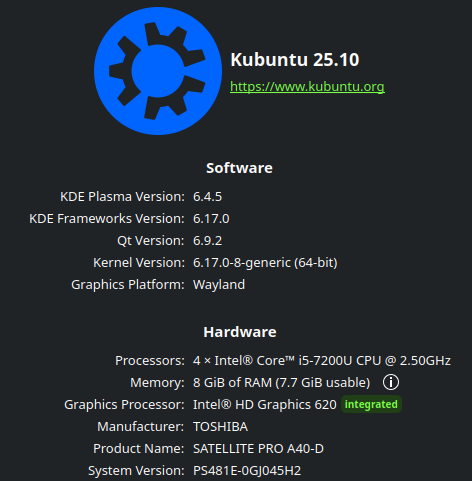
i run linux on a pretty old laptop (toshiba satelite pro a40-d-1ku)
i will provide some images and the system’s specs
any help would be appreciated!
davidre
December 16, 2025, 9:49am
2
what happens if you run
/usr/lib/x86_64-linux-gnu/libexec/ksystemstats_intel_helper
in a terminal?
i get an error message saying:
Failed opening any event
but when i run it with sudo it brings up a bunch of numbers
1000139014|Frequency|2|Interrupts|48|Render|1235525|Copy|0|Video|0|Enhance|0
stuff like that
hi, welcome.
could be a missing sensor.
try running sudo sensors-detect and thru all the prompts.
if need be install the package lm-sensors so you can run the above command.
hi! just installed lm-sensors and ran the command you sent, pressed y on all the prompts, not really sure what it did..
did it find any new sensors?
you may need to restart for new modules to take effect.
run sensors to see all the detected sensors and their readings
you should have a section for the GPU
i dont understand what’s going on… i tried restarting, running sensors and sudo sensors-detect but nothing there says GPU
your specs indicate you are using the iGPU on the device… this info might help
if sensors does not pick up anything then there may not be anything to pickup, the temp of the GPU is the temp of the CPU since they are on the same chip.
and total GPU usage may be all you can get.
none of those seem to be doing anything…. when i ran the system monitor through sudo strace plasma-systemmonitor it DOES show my gpu usage… idk why it doesnt normally… am i missing a package?
maybe.
the not-LTS track is sometimes missing some packages.
davidre
December 16, 2025, 4:25pm
11
Hi this means it’s an error on the distro side. For intel gpu certain priviliges are needed, see
The same issue on debian was discussed here:
Hi,
I’ve just tested out the Fedora 43 Kde live and the gpu monitoring on the system monitor work perfectly however my laptop is currently running Debian Unstable with latest kernel 6.17.6 and the gpu monitoring isn’t working at all it always show 0, so could someone help me out? What’s the differences in terms of the software / package that I might needed for it to work?
Thanks in advance!
Please report this to your distro and disregard the other info this thread which is not accurate for your problem.
Each core on the CPU has its own temp sensor and so will the GPU.
In other words the GPU and CPU are not at the same temp usually.
As can be seen in sensors output:
coretemp-isa-0000
Adapter: ISA adapter
Package id 0:  +39.0°C  (high = +80.0°C, crit = +100.0°C)
Core 0:        +30.0°C  (high = +80.0°C, crit = +100.0°C)
Core 4:        +26.0°C  (high = +80.0°C, crit = +100.0°C)
Core 8:        +30.0°C  (high = +80.0°C, crit = +100.0°C)
Core 12:       +27.0°C  (high = +80.0°C, crit = +100.0°C)
...
Hi David! thank you for replying again, i wanted to ask what to do once i’m on this page, i apologize if it’s obvious, I’m band new to linux and i get lost in all the technical lingo and sometimes it overwhelms me
if you are on kubuntu that package should already be installed… to check just type
sudo apt install ksystemstats
and it will either tell you it’s already installed or it will install it.
davidre
December 17, 2025, 8:24am
15
Hi you need to report this to kubuntu, they need to make sure the program has the correct powers to read the intel gpu usage.
1 Like
davidre:
.
ok, how do i go about reporting?
davidre
December 17, 2025, 10:38am
17
1 Like