So I’ve been unable to open files using an alternate program through Dolphin. First, if I right-click on say a PDF for example there is no “Open With” option in the menu. Next, if I click on Properties and then try to change the Open With (which shows “No associated applications” currently) I get the error “Could not find the “keditfiletype” executable in PATH.” Additionally in System Settings I have the Default PDF viewer set to Okular, and under File Associations I removed the listed applications for ‘pdf’ down to Okular and LibreOffice Impress. I’ve also rebooted several times after checking/changing the settings. ALSO, when I searched for an answer online I read that I needed to install kde-cli-tools. I found that they were already installed so I reinstalled them just in case using ‘sudo dnf reinstall kde-cli-tools’ which said it was successful. Anyone have an idea what the issue could be? (Also this happens regardless of file location, from home folders to mounted drives.)
Oh I should also mention that it’s defaulting to open PDFs in the Gnome File Viewer (Evince) if that’s pertinent information. Even though I’m in Plasma desktop and using Dolphin file explorer…
Did you even notice that you typed this all on a single block?
Very confusing, difficult to read, difficult to understand, and with no relevant system information.
inxi --admin --verbosity=8 --filter --no-host --width
open files using an alternate program through Dolphin.
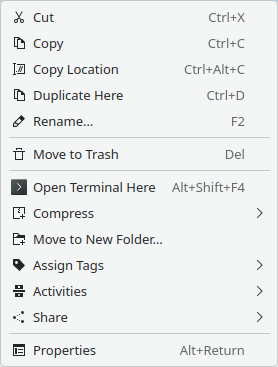
You mean ‘open with…’ does not appear in Dolphin for a context click.
It should show ‘Open with Okular’ and ‘Open with…’ as top two options if you had KDE Plasma installed…
But you didn’t say. Neither did you say if you tried this on a fresh USER account.
Could not find the "keditfiletype" executable in PATH
Sounds like Dolphin isn’t running on Plasma, or it’s in some non-standard environment where keditfiletye or kde-cli-tools isn’t exposed to Dolphin.
This is a mess - need more information I think.
I apologize for the formatting. I didn’t realize it would be confusing.
Yes I am in KDE Plasma, and while in Dolphin I don’t have ‘Open with Okular’ or ‘Open with…’ showing in my right click menu.
I will include the inxi output you requested:
System:
Kernel: 6.16.12-200.fc42.x86_64 arch: x86_64 bits: 64 compiler: gcc v: 15.2.1
clocksource: tsc avail: hpet,acpi_pm
parameters: BOOT_IMAGE=(hd0,gpt5)/vmlinuz-6.16.12-200.fc42.x86_64
root=UUID=4fcde6bb-1374-4b57-89d2-5265d5a78998 ro rootflags=subvol=root
rhgb quiet
Desktop: KDE Plasma v: 6.4.5 tk: Qt v: N/A info: frameworks v: 6.19.0
wm: kwin_wayland vt: 2 dm: SDDM Distro: Fedora Linux 42 (Workstation Edition)
Machine:
Type: Desktop Mobo: Micro-Star model: B550M PRO-VDH WIFI (MS-7C95) v: 1.0
serial: uuid:
UEFI: American Megatrends v: 2.00 date: 06/04/2020
Battery:
Message: No system battery data found. Is one present?
Memory:
System RAM: total: 16 GiB available: 15.55 GiB used: 4.51 GiB (29.0%)
Message: For most reliable report, use superuser + dmidecode.
Array-1: capacity: 128 GiB slots: 4 modules: 2 EC: None
max-module-size: 32 GiB note: est.
Device-1: Channel-A DIMM 0 type: no module installed
Device-2: Channel-A DIMM 1 type: DDR4 detail: synchronous unbuffered
(unregistered) size: 8 GiB speed: 2133 MT/s volts: note: check curr: 1
min: 1 max: 1 width (bits): data: 64 total: 64 manufacturer: Corsair
part-no: CMK16GX4M2B3200C16 serial: N/A
Device-3: Channel-B DIMM 0 type: no module installed
Device-4: Channel-B DIMM 1 type: DDR4 detail: synchronous unbuffered
(unregistered) size: 8 GiB speed: 2133 MT/s volts: note: check curr: 1
min: 1 max: 1 width (bits): data: 64 total: 64 manufacturer: Corsair
part-no: CMK16GX4M2B3200C16 serial: N/A
PCI Slots:
Permissions: Unable to run dmidecode. Root privileges required.
CPU:
Info: model: AMD Ryzen 5 3600 bits: 64 type: MT MCP arch: Zen 2 gen: 2
level: v3 note: check built: 2020-22 process: TSMC n7 (7nm) family: 0x17 (23)
model-id: 0x71 (113) stepping: 0 microcode: 0x8701034
Topology: cpus: 1x dies: 1 clusters: 1 cores: 6 threads: 12 tpc: 2
smt: enabled cache: L1: 384 KiB desc: d-6x32 KiB; i-6x32 KiB L2: 3 MiB
desc: 6x512 KiB L3: 32 MiB desc: 2x16 MiB
Speed (MHz): avg: 3600 min/max: 2200/4208 boost: enabled scaling:
driver: acpi-cpufreq governor: performance cores: 1: 3600 2: 3600 3: 3600
4: 3600 5: 3600 6: 3600 7: 3600 8: 3600 9: 3600 10: 3600 11: 3600 12: 3600
bogomips: 86405
Flags: 3dnowprefetch abm adx aes aperfmperf apic arat avic avx avx2 bmi1
bmi2 bpext cat_l3 cdp_l3 clflush clflushopt clwb clzero cmov cmp_legacy
constant_tsc cpb cpuid cqm cqm_llc cqm_mbm_local cqm_mbm_total
cqm_occup_llc cr8_legacy cx16 cx8 de decodeassists extapic extd_apicid
f16c flushbyasid fma fpu fsgsbase fxsr fxsr_opt ht hw_pstate ibpb ibs
irperf lahf_lm lbrv lm mba mca mce misalignsse mmx mmxext monitor movbe
msr mtrr mwaitx nonstop_tsc nopl npt nrip_save nx osvw overflow_recov pae
pat pausefilter pclmulqdq pdpe1gb perfctr_core perfctr_llc perfctr_nb
pfthreshold pge pni popcnt pse pse36 rapl rdpid rdpru rdrand rdseed rdt_a
rdtscp rep_good sep sev sev_es sha_ni skinit smap smca smep ssbd sse sse2
sse4_1 sse4_2 sse4a ssse3 stibp succor svm svm_lock syscall tce topoext
tsc tsc_scale umip v_spec_ctrl v_vmsave_vmload vgif vmcb_clean vme vmmcall
wbnoinvd wdt xgetbv1 xsave xsavec xsaveerptr xsaveopt xtopology
Vulnerabilities:
Type: gather_data_sampling status: Not affected
Type: ghostwrite status: Not affected
Type: indirect_target_selection status: Not affected
Type: itlb_multihit status: Not affected
Type: l1tf status: Not affected
Type: mds status: Not affected
Type: meltdown status: Not affected
Type: mmio_stale_data status: Not affected
Type: old_microcode status: Not affected
Type: reg_file_data_sampling status: Not affected
Type: retbleed mitigation: untrained return thunk; SMT enabled with STIBP
protection
Type: spec_rstack_overflow mitigation: Safe RET
Type: spec_store_bypass mitigation: Speculative Store Bypass disabled via
prctl
Type: spectre_v1 mitigation: usercopy/swapgs barriers and __user pointer
sanitization
Type: spectre_v2 mitigation: Retpolines; IBPB: conditional; STIBP:
always-on; RSB filling; PBRSB-eIBRS: Not affected; BHI: Not affected
Type: srbds status: Not affected
Type: tsa status: Not affected
Type: tsx_async_abort status: Not affected
Type: vmscape mitigation: IBPB before exit to userspace
Graphics:
Device-1: NVIDIA TU116 [GeForce GTX 1660 Ti] vendor: Micro-Star MSI
driver: nouveau v: kernel non-free: 550-580.xx+ status: current (as of
2025-08; EOL~2026-12-xx) arch: Turing code: TUxxx process: TSMC 12nm FF
built: 2018-2022 pcie: gen: 1 speed: 2.5 GT/s lanes: 16 link-max: gen: 3
speed: 8 GT/s ports: active: DP-3 empty: DP-1,DP-2,HDMI-A-1 bus-ID: 2b:00.0
chip-ID: 10de:2182 class-ID: 0300
Display: wayland server: Xwayland v: 24.1.8 compositor: kwin_wayland
driver: gpu: nouveau display-ID: 0
Monitor-1: DP-3 model: LG (GoldStar) ULTRAWIDE serial: built: 2025
res: mode: 3440x1440 hz: 100 scale: 100% (1) dpi: 109 gamma: 1.2 chroma: red:
x: 0.651 y: 0.325 green: x: 0.302 y: 0.624 blue: x: 0.145 y: 0.059 white:
x: 0.314 y: 0.329 size: 800x334mm (31.5x13.15") diag: 867mm (34.1")
modes: 3440x1440, 1920x1080, 1280x720, 1024x768, 800x600, 720x480, 640x480
EDID-Warnings: 1: parse_edid: unknown tag 0
API: EGL v: 1.5 platforms: device: 0 drv: zink device: 1 drv: swrast gbm:
drv: zink surfaceless: drv: zink wayland: drv: zink x11: drv: zink
API: OpenGL v: 4.6 compat-v: 4.5 vendor: mesa v: 25.1.9 glx-v: 1.4
direct-render: yes renderer: zink Vulkan 1.4(NVIDIA GeForce GTX 1660 Ti (NVK
TU116) (MESA_NVK)) device-ID: 10de:2182 memory: 6.1 GiB unified: no
display-ID: :0.0
API: Vulkan v: 1.4.313 layers: 1 device: 0 type: discrete-gpu name: NVIDIA
GeForce GTX 1660 Ti (NVK TU116) driver: mesa nvk v: 25.1.9
device-ID: 10de:2182 surfaces: N/A device: 1 type: cpu name: llvmpipe
(LLVM 20.1.8 256 bits) driver: mesa llvmpipe v: 25.1.9 (LLVM 20.1.8)
device-ID: 10005:0000 surfaces: N/A
Info: Tools: api: clinfo, eglinfo, glxinfo, vulkaninfo
de: kscreen-console,kscreen-doctor wl: wayland-info x11: xdriinfo, xdpyinfo,
xprop, xrandr
Audio:
Device-1: NVIDIA TU116 High Definition Audio vendor: Micro-Star MSI
driver: snd_hda_intel v: kernel pcie: gen: 2 speed: 5 GT/s lanes: 16
link-max: gen: 3 speed: 8 GT/s bus-ID: 2b:00.1 chip-ID: 10de:1aeb
class-ID: 0403
Device-2: Advanced Micro Devices [AMD] Starship/Matisse HD Audio
vendor: Micro-Star MSI driver: snd_hda_intel v: kernel pcie: gen: 4
speed: 16 GT/s lanes: 16 bus-ID: 2d:00.4 chip-ID: 1022:1487 class-ID: 0403
Device-3: SteelSeries ApS Arctis Nova 5X
driver: hid-generic,snd-usb-audio,usbhid type: USB rev: 2.0 speed: 12 Mb/s
lanes: 1 mode: 1.1 bus-ID: 1-5:7 chip-ID: 1038:2253 class-ID: 0300
API: ALSA v: k6.16.12-200.fc42.x86_64 status: kernel-api
tools: alsactl,alsamixer,amixer
Server-1: PipeWire v: 1.4.9 status: active with: 1: pipewire-pulse
status: active 2: wireplumber status: active 3: pipewire-alsa type: plugin
4: pw-jack type: plugin tools: pactl,pw-cat,pw-cli,wpctl
Network:
Device-1: Intel Dual Band Wireless-AC 3168NGW [Stone Peak] driver: iwlwifi
v: kernel pcie: gen: 1 speed: 2.5 GT/s lanes: 1 bus-ID:
chip-ID: class-ID:
IF: wlo1 state: down mac:
Device-2: Realtek RTL8111/8168/8211/8411 PCI Express Gigabit Ethernet
vendor: Micro-Star MSI driver: r8169 v: kernel pcie: gen: 1 speed: 2.5 GT/s
lanes: 1 port: f000 bus-ID: 2a:00.0 chip-ID: 10ec:8168 class-ID: 0200
IF: enp42s0 state: up speed: 1000 Mbps duplex: full mac:
IP v4: type: dynamic noprefixroute scope: global
broadcast:
IP v6: type: noprefixroute scope: link
Info: services: NetworkManager
WAN IP:
Bluetooth:
Device-1: Intel Wireless-AC 3168 Bluetooth driver: btusb v: 0.8 type: USB
rev: 2.0 speed: 12 Mb/s lanes: 1 mode: 1.1 bus-ID: 1-9:6 chip-ID:
class-ID:
Report: btmgmt ID: hci0 rfk-id: 0 state: down bt-service: enabled,running
rfk-block: hardware: no software: yes address: bt-v: 4.2 lmp-v: 8
status: discoverable: no pairing: no
Logical:
Message: No logical block device data found.
RAID:
Message: No RAID data found.
Drives:
Local Storage: total: 2.27 TiB used: 824.69 GiB (35.4%)
SMART Message: Unable to run smartctl. Root privileges required.
ID-1: /dev/sda maj-min: 8:0 vendor: Western Digital model: WDS500G2B0A
size: 465.76 GiB block-size: physical: 512 B logical: 512 B speed: 6.0 Gb/s
tech: SSD serial: fw-rev: 90WD scheme: GPT
ID-2: /dev/sdb maj-min: 8:16 vendor: Western Digital
model: WD20EZAZ-00GGJB0 size: 1.82 TiB block-size: physical: 4096 B
logical: 512 B speed: 6.0 Gb/s tech: HDD rpm: 5400 serial:
fw-rev: 0A80 scheme: GPT
Message: No optical or floppy data found.
Partition:
ID-1: / raw-size: 194.31 GiB size: 194.31 GiB (100.00%)
used: 24.62 GiB (12.7%) fs: btrfs dev: /dev/sda6 maj-min: 8:6 label: fedora
uuid:
ID-2: /boot raw-size: 1024 MiB size: 973.4 MiB (95.06%)
used: 676 MiB (69.5%) fs: ext4 dev: /dev/sda5 maj-min: 8:5 label: N/A
uuid:
ID-3: /boot/efi raw-size: 100 MiB size: 96 MiB (96.00%)
used: 55.3 MiB (57.6%) fs: vfat dev: /dev/sda1 maj-min: 8:1 label: N/A
uuid:
ID-4: /home raw-size: 194.31 GiB size: 194.31 GiB (100.00%)
used: 24.62 GiB (12.7%) fs: btrfs dev: /dev/sda6 maj-min: 8:6 label: fedora
uuid:
ID-5: /run/media/[username]/Files raw-size: 1.15 TiB
size: 1.15 TiB (100.00%) used: 763.63 GiB (65.1%) fs: exfat dev: /dev/sdb2
maj-min: 8:18 label: Files uuid:
ID-6: /run/media/[username]/Work raw-size: 244.14 GiB
size: 244.14 GiB (100.00%) used: 35.72 GiB (14.6%) fs: ntfs dev: /dev/sdb4
maj-min: 8:20 label: Work uuid:
Swap:
Kernel: swappiness: 10 (default 60) cache-pressure: 100 (default) zswap: no
ID-1: swap-1 type: zram size: 8 GiB used: 0 KiB (0.0%) priority: 100
comp: lzo-rle avail: lzo,lz4,lz4hc,zstd,deflate,842 dev: /dev/zram0
Unmounted:
ID-1: /dev/sda2 maj-min: 8:2 size: 16 MiB fs: label: N/A
uuid:
ID-2: /dev/sda3 maj-min: 8:3 size: 269.59 GiB fs: ntfs label: N/A
uuid:
ID-3: /dev/sda4 maj-min: 8:4 size: 759 MiB fs: ntfs label: N/A
uuid:
ID-4: /dev/sdb1 maj-min: 8:17 size: 16 MiB fs:
label: N/A uuid:
ID-5: /dev/sdb3 maj-min: 8:19 size: 446.29 GiB fs: ntfs label: Games
uuid:
USB:
Hub-1: 1-0:1 info: hi-speed hub with single TT ports: 10 rev: 2.0
speed: 480 Mb/s (57.2 MiB/s) lanes: 1 mode: 2.0 chip-ID: 1d6b:0002
class-ID: 0900
Device-1: 1-3:2 info: Logitech Unifying Receiver type: keyboard,mouse,HID
driver: logitech-djreceiver,usbhid interfaces: 3 rev: 2.0
speed: 12 Mb/s (1.4 MiB/s) lanes: 1 mode: 1.1 power: 98mA
chip-ID: 046d:c52b class-ID: 0300
Device-2: 1-5:7 info: SteelSeries ApS Arctis Nova 5X type: audio,HID
driver: hid-generic,snd-usb-audio,usbhid interfaces: 6 rev: 2.0
speed: 12 Mb/s (1.4 MiB/s) lanes: 1 mode: 1.1 power: 100mA
chip-ID: 1038:2253 class-ID: 0300
Hub-2: 1-7:4 info: Genesys Logic Hub ports: 4 rev: 2.0
speed: 480 Mb/s (57.2 MiB/s) lanes: 1 mode: 2.0 power: 100mA
chip-ID: 05e3:0608 class-ID: 0900
Device-1: 1-8:5 info: Micro Star MYSTIC LIGHT type: HID
driver: hid-generic,usbhid interfaces: 1 rev: 1.1 speed: 12 Mb/s (1.4 MiB/s)
lanes: 1 mode: 1.1 power: 500mA chip-ID: 1462:7c95 class-ID: 0300
serial:
Device-2: 1-9:6 info: Intel Wireless-AC 3168 Bluetooth type: bluetooth
driver: btusb interfaces: 2 rev: 2.0 speed: 12 Mb/s (1.4 MiB/s) lanes: 1
mode: 1.1 power: 100mA chip-ID: 8087:0aa7 class-ID: e001
Hub-3: 2-0:1 info: super-speed hub ports: 4 rev: 3.1
speed: 10 Gb/s (1.16 GiB/s) lanes: 1 mode: 3.2 gen-2x1 chip-ID: 1d6b:0003
class-ID: 0900
Hub-4: 3-0:1 info: hi-speed hub with single TT ports: 2 rev: 2.0
speed: 480 Mb/s (57.2 MiB/s) lanes: 1 mode: 2.0 chip-ID: 1d6b:0002
class-ID: 0900
Hub-5: 4-0:1 info: super-speed hub ports: 4 rev: 3.1
speed: 10 Gb/s (1.16 GiB/s) lanes: 1 mode: 3.2 gen-2x1 chip-ID: 1d6b:0003
class-ID: 0900
Hub-6: 5-0:1 info: hi-speed hub with single TT ports: 4 rev: 2.0
speed: 480 Mb/s (57.2 MiB/s) lanes: 1 mode: 2.0 chip-ID: 1d6b:0002
class-ID: 0900
Device-1: 5-1:2 info: RK Gaming Keyboard type: keyboard,HID
driver: hid-generic,usbhid interfaces: 2 rev: 2.0 speed: 12 Mb/s (1.4 MiB/s)
lanes: 1 mode: 1.1 power: 500mA chip-ID: 258a:01e7 class-ID: 0300
Device-2: 5-3:3 info: Areson Corp Elecom MR-K013 Multicard Reader
type: keyboard,mouse driver: hid-generic,usbhid interfaces: 2 rev: 1.1
speed: 12 Mb/s (1.4 MiB/s) lanes: 1 mode: 1.1 power: 100mA
chip-ID: 25a7:fa61 class-ID: 0301
Hub-7: 6-0:1 info: super-speed hub ports: 4 rev: 3.1
speed: 10 Gb/s (1.16 GiB/s) lanes: 1 mode: 3.2 gen-2x1 chip-ID: 1d6b:0003
class-ID: 0900
Sensors:
System Temperatures: cpu: 51.5 C mobo: N/A
Fan Speeds (rpm): N/A
Repos:
Packages: 2729 pm: rpm pkgs: 2673 libs: 529 tools: dnf,gnome-software,yum
pm: flatpak pkgs: 56
No active dnf repos in: /etc/dnf/dnf.conf
Active yum repos in: /etc/yum.repos.d/_copr:copr.fedorainfracloud.org:phracek:PyCharm.repo
1: copr:copr.fedorainfracloud.org:phracek:PyCharm ~
Active yum repos in: /etc/yum.repos.d/fedora-cisco-openh264.repo
1: fedora-cisco-openh264 ~
No active yum repos in: /etc/yum.repos.d/fedora-updates-testing.repo
Active yum repos in: /etc/yum.repos.d/fedora-updates.repo
1: updates ~
Active yum repos in: /etc/yum.repos.d/fedora.repo
1: fedora ~
Active yum repos in: /etc/yum.repos.d/google-chrome.repo
1: google-chrome ~
No active yum repos in: /etc/yum.repos.d/rpmfusion-free-updates-testing.repo
Active yum repos in: /etc/yum.repos.d/rpmfusion-free-updates.repo
1: rpmfusion-free-updates ~
Active yum repos in: /etc/yum.repos.d/rpmfusion-free.repo
1: rpmfusion-free ~
Active yum repos in: /etc/yum.repos.d/rpmfusion-nonfree-nvidia-driver.repo
1: rpmfusion-nonfree-nvidia-driver ~
Active yum repos in: /etc/yum.repos.d/rpmfusion-nonfree-steam.repo
1: rpmfusion-nonfree-steam ~
No active yum repos in: /etc/yum.repos.d/rpmfusion-nonfree-updates-testing.repo
Active yum repos in: /etc/yum.repos.d/rpmfusion-nonfree-updates.repo
1: rpmfusion-nonfree-updates ~
Active yum repos in: /etc/yum.repos.d/rpmfusion-nonfree.repo
1: rpmfusion-nonfree ~
Processes:
CPU top: 5 of 1040
1: cpu: 5.4% command: firefox pid: 4588 mem: 534.3 MiB (3.3%)
2: cpu: 4.5% command: firefox pid: 3630 mem: 670.3 MiB (4.2%)
3: cpu: 4.5% command: [kworker/u50:8-btrfs-delalloc] pid: 7014
mem: 0.00 MiB (0.0%)
4: cpu: 3.1% command: ticktick pid: 3514 mem: 335.0 MiB (2.1%)
5: cpu: 3.0% command: [kworker/u50:4-btrfs-endio] pid: 5004
mem: 0.00 MiB (0.0%)
Memory top: 5 of 1040
1: mem: 670.3 MiB (4.2%) command: firefox pid: 3630 cpu: 4.5%
2: mem: 534.3 MiB (3.3%) command: firefox pid: 4588 cpu: 5.4%
3: mem: 459.1 MiB (2.8%) command: plasmashell pid: 2065 cpu: 1.0%
4: mem: 437.8 MiB (2.7%) command: DiscoverNotifier pid: 2422 cpu: 0.0%
5: mem: 387.8 MiB (2.4%) command: firefox pid: 4382 cpu: 1.1%
Info:
Processes: 1040 Power: uptime: 1h 8m states: freeze,mem,disk suspend: deep
avail: s2idle wakeups: 0 hibernate: platform avail: shutdown, reboot,
suspend, test_resume image: 6.16 GiB services: org_kde_powerdevil,upowerd
Init: systemd v: 257 target: graphical (5) default: graphical
tool: systemctl
Compilers: N/A Shell: Bash v: 5.2.37 running-in: konsole inxi: 3.3.39
I had not previously tried using another account, but I just created a fresh Standard user account (as opposed to the original Admin account I am currently in) and the new fresh account appears to have the same menu issue in Dolphin, and a problem with the ‘keditfiletype’ excecutable path. Both user accounts are using KDE Plasma.
Do you have okular installed ?
Is your context menu screenshot truncated, the Open With should be above Cut.

That’s a serious bug, Open action should always be there.
Have you installed Dolphin from Flathub or the KDE nightly Flatpak repo? If so, this is https://bugs.kde.org/show_bug.cgi?id=508205, and you can find a bunch more listed at Tracking issue for bugs in KDE software caused by running all apps as Flatpaks (#71) · Issues · KDE Linux / KDE Linux · GitLab.
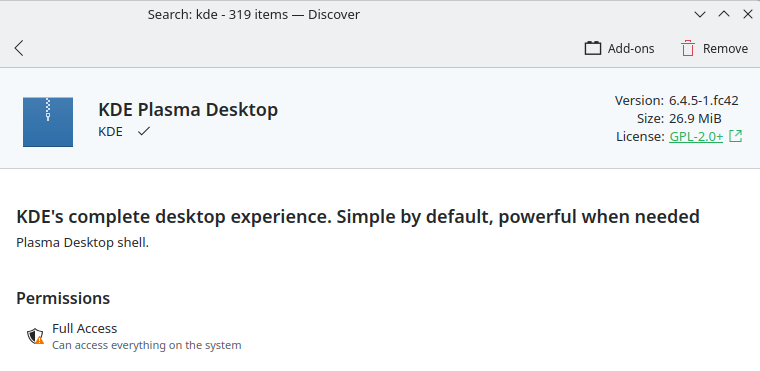
I think I found the repository info using ‘dnf history’ command. Is this a flatpak or flathub install?
Transaction ID : 8
Begin time : 2025-10-13 17:10:15
Begin rpmdb : 34cddef535b9032d46e43ce975d0a7dad7af9799a94fdf7fccbadd4687270a6b
End time : 2025-10-13 17:10:24
End rpmdb : 2aecb343a5f4ebf0826d8e2bcd4caf2b6d963ef2a69c2f9f0709042522eb9202
User : 1000 redacted
Status : Ok
Releasever : 42
Description : dnf install @kde-desktop-environment
Comment :
Packages altered:
Action Package Reason Repository
Install setroubleshoot-0:3.3.35-4.fc42.x86_64 Group fedora
Install minicom-0:2.9-4.fc42.x86_64 Group fedora
Install imsettings-gsettings-0:1.8.10-2.fc42.x86_64 Group fedora
Install im-chooser-0:1.7.5-3.fc42.x86_64 Group fedora
Install imsettings-0:1.8.10-2.fc42.x86_64 Group fedora
Install setroubleshoot-server-0:3.3.35-4.fc42.x86_64 Dependency fedora
Install imsettings-libs-0:1.8.10-2.fc42.x86_64 Dependency fedora
Install im-chooser-common-0:1.7.5-3.fc42.x86_64 Dependency fedora
Install python3-libxml2-0:2.12.10-1.fc42.x86_64 Dependency fedora
Install setroubleshoot-plugins-0:3.3.15-2.fc42.noarch Dependency fedora
Install system-config-language-0:3.5.0-16.fc42.noarch Group updates
Install python3-newt-0:0.52.25-1.fc42.x86_64 Dependency fedora
Install newt-0:0.52.25-1.fc42.x86_64 Dependency fedora
Install ibus-table-chinese-cangjie-0:1.8.14-1.fc42.noarch Group updates
Install ibus-table-chinese-0:1.8.14-1.fc42.noarch Dependency updates
Install imsettings-plasma-0:1.8.10-2.fc42.x86_64 Group fedora
Install gstreamer1-plugins-bad-freeworld-1:1.26.6-1.fc42.x86_64 Group rpmfusion-free-updates
Install librtmp-0:2.6-1.20240301.git6f6bb13.fc42.x86_64 Dependency rpmfusion-free
Install svt-hevc-libs-0:1.5.1-8.fc42.x86_64 Dependency rpmfusion-free
Install gstreamer1-plugins-ugly-1:1.26.6-1.fc42.x86_64 Group rpmfusion-free-updates
Install pipewire-codec-aptx-0:1.4.8-1.fc42.x86_64 Group rpmfusion-free-updates
Install libfreeaptx-0:0.2.2-1.fc42.x86_64 Dependency rpmfusion-free
Install libde265-0:1.0.16-1.fc42.x86_64 Dependency rpmfusion-free-updates
Install ibus-table-0:1.17.16-1.fc42.noarch Dependency updates
Install rpmfusion-nonfree-appstream-data-0:42-1.fc42.noarch Group rpmfusion-nonfree
Install rpmfusion-free-appstream-data-0:42-1.fc42.noarch Group rpmfusion-free
Install gtk3-immodule-xim-0:3.24.49-2.fc42.x86_64 Group fedora
Install libheif-freeworld-0:1.19.8-1.fc42.x86_64 Group rpmfusion-free-updates
Install libva-intel-driver-0:2.4.1^20241027gitd30e013-1.fc42.x86_64 Group rpmfusion-free
Install gtk2-immodule-xim-0:2.24.33-19.fc41.x86_64 Group fedora
Install intel-media-driver-0:25.2.6-1.fc42.x86_64 Dependency rpmfusion-nonfree-updates
Groups altered:
Action Package Reason Repository
Install admin-tools Dependency fedora
Install base-graphical Dependency fedora
Install core Dependency fedora
Install desktop-accessibility Dependency fedora
Install dial-up Dependency fedora
Install fonts Dependency fedora
Install guest-desktop-agents Dependency fedora
Install hardware-support Dependency fedora
Install input-methods Dependency fedora
Install kde-desktop Dependency fedora
Install multimedia Dependency fedora
Install networkmanager-submodules Dependency fedora
Install printing Dependency fedora
Install standard Dependency fedora
Environments altered:
Action Package Reason Repository
Install kde-desktop-environment User fedora
No, it’s an RPM package install - dnf doesn’t deal with Flatpaks.
If you do dnf list --installed dolphin, it will show you the version of Dolphin you have and the repo it came from.
Did this install start life as a GNOME system by any chance?
(Guessing a bit based on Evince being present, and your doing sudo dnf install @kde-desktop-environment, which wouldn’t be necessary on an out of the box Fedora KDE edition install.)

Sorry it keeps removing the unknown repo text because of formatting I think. Here’s a screenshot:

Edit: Should I consider doing a fresh KDE linux install instead?  Or do you think it’s worth pursuing a fix of some sort? I’m kind of okay either way at this point haha
Then I suspect that it would be much simpler to backup and reinstall a clean KDE Plasma desktop, then re-import relevant settings etc.
Certainly I found this the best course when I previously tried other desktops - there are many hidden gremlins, services, settings…
An initial reinstall is about 5 mins, then importing and setting up maybe another hour or three… and it took me another 2-3 days to iron out creases (like Conky configs and random scripts that needed adjusting).
It might be worth creating a new user on your existing install. Could be that your existing user’s homedir has some GNOME config files that interfere with Plasma.
It wouldn’t hurt to try a new USER account - but there are deeper systems at play:
- system-wide configurations and installed packages might still cause issues. The core installation includes packages and dependencies for GNOME, which might not be fully removed or might conflict with KDE.
- Reinstalling the entire system with KDE Plasma would ensure a clean installation without any GNOME remnants, it sounds more drastic, but with backups it really isn’t.
I would assume, however, that OP already has backups in place. I’d say that 90% of the refresh could be successfully completed in just an hour or two with no more worries about having multiple file browsers, services, keyrings…
So yes, try the new USER first (avoids reinstalling software). Don’t forget (as I did) you should also export a pkglist in case you really do a fresh install.
You’re right. And I missed that OP had said the “the new fresh account appears to have the same menu issue in Dolphin”.
So agreed, a fresh install of Fedora KDE edition makes sense.
Thanks to everyone for your help troubleshooting. I did a fresh Fedora KDE Desktop install and everything is working as intended. 
That’s great - and it’s nice to know you’ll get a cleaner experience that way - but now you’ve got a few years work going into Plasma settings ahead of you  and that’s never ending..